If you do not remember your password, you can simply click forgot password on AiBE webpage.
There will be a popup for you to enter your email address and send yourself a reset link.
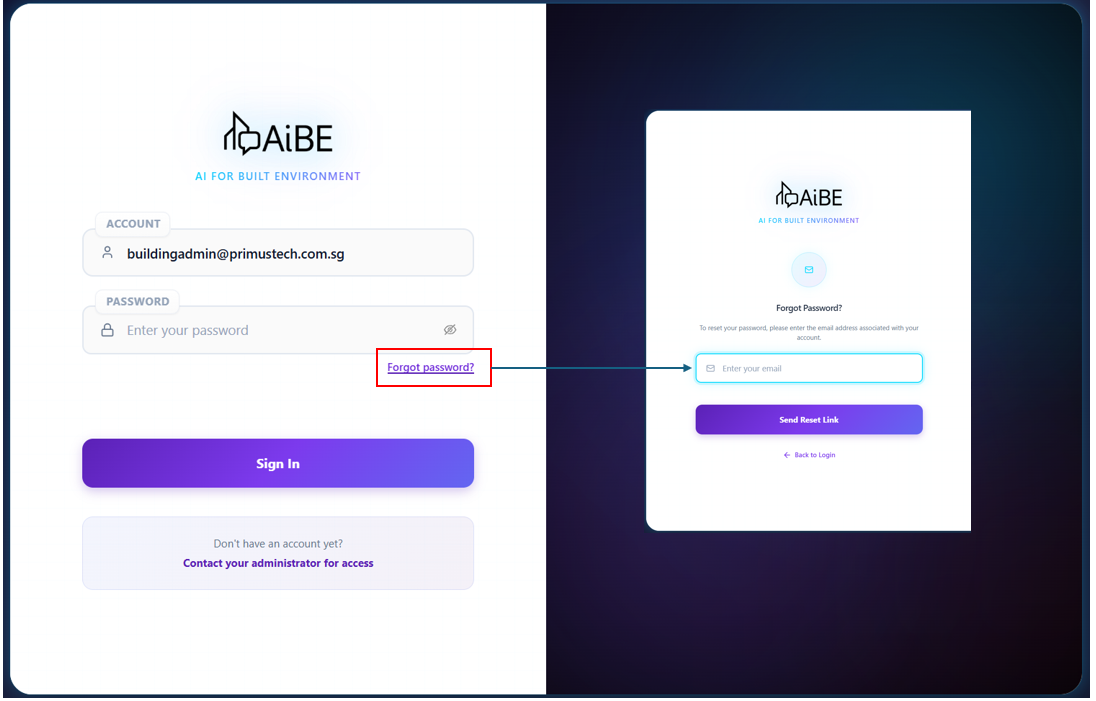
The link sent to your email will only be valid for 5 minutes, if you missed the frame, you will need to repeat the process. Do note that once you missed the reset link timeframe for 5 consecutive time, your account will be lock for 10 minutes before you can reset again.
If there is still problem accessing AiBE, feel free to submit a ticket on this ticketing platform or email us via ebu-support@primustech.com.sg
Was this article helpful?
That’s Great!
Thank you for your feedback
Sorry! We couldn't be helpful
Thank you for your feedback
Feedback sent
We appreciate your effort and will try to fix the article